 Stepdy
A bottle that fills
The day's water as a bottle and a percentage, today's drinks with their times, and your week as columns. You can also log a glass from a widget, from Control Center or straight from a reminder.
Water tracker
Stepdy's Water tab is a bottle that fills as you log. Set a daily goal, pick a glass size, and turn on reminders that stop for the day once you reach it.
 Free · No ads · No sign-up
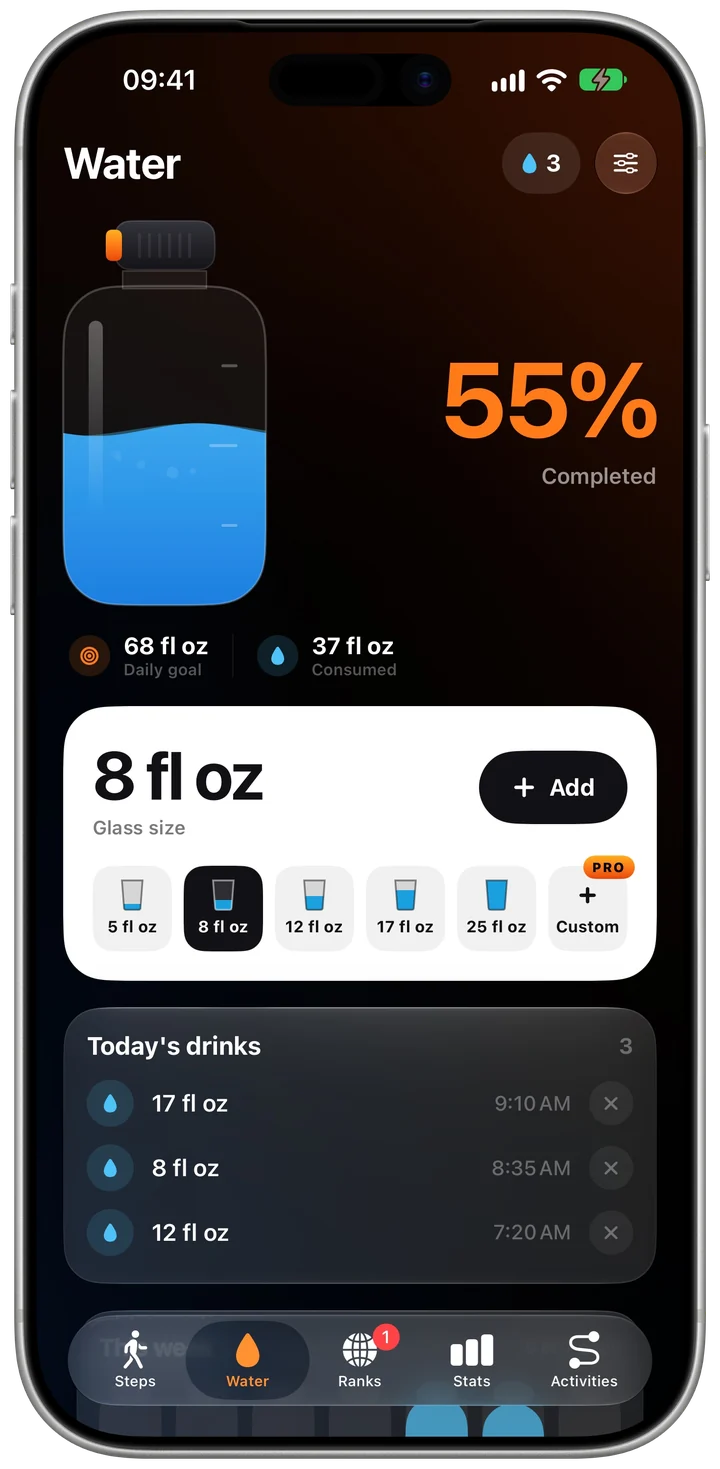
Screenshots: Stepdy on an iPhone simulator, with sample data.
Anything from 1,000 to 5,000 ml a day; 2,000 ml until you change it. On an iPhone set to a US region, the app uses fluid ounces.
Tap Add. The glass sizes are 150, 250, 350, 500 and 750 ml; with Pro, any size from 50 to 1,500 ml.
Turn on reminders every 1, 2 or 3 hours between the times you choose. They stop for the day once you reach your goal.
The day's water as a bottle and a percentage, today's drinks with their times, and your week as columns. You can also log a glass from a widget, from Control Center or straight from a reminder.
Stepdy Pro adds three more bottle styles and a glass size of your own.
Yes. Water tracking in Stepdy, reminders included, is free. It sits next to your step count, so one app covers both.
No. They stop for the day once you reach your water goal.
No. Your water log stays in Stepdy on your iPhone.